Documentation
Storyline
Long before the events of the game, all the world lived in balance. Ice stretched across the north, fire ruled the south, and water and stone held the middle ground. Every climate zone had its place — order reigned, and peace held.
Then the Thermocollapse struck.
Without warning, the boundaries between climate zones shattered. Lava tore through frozen glaciers. Boiling water swallowed stone fields. Ice crept over volcanic plains. Every climate zone collapsed into one chaotic, hostile landscape — a world where you can stand on ice next to a lava pool, where scorching hot springs bubble up through frozen tundra.
The Ancients foresaw this catastrophe. Before the collapse, they hid the Order Fortresses deep within the chaos zones — sealed vaults containing the power to restore the world's balance. Each fortress is locked behind a set of ancient magical keys, scattered throughout the chaos. Only someone who has gathered every last key from a zone may enter.
You are the last ThermoWalker — a wanderer trained to survive any climate. Armed with nothing but a ThermoGauge, you must cross the chaos zones, collect the scattered keys, and reach the Order Fortress. Only then can the world's balance be restored.
Core Gameplay
ThermoTrail 512 is a grid-based top-down runner. The world scrolls upward as you move deeper into the chaos zone. Every step brings new terrain, new hazards, and new decisions.
Navigate with WASD or the arrow keys. You move one tile at a time in four directions. Each terrain type has a movement cooldown — some surfaces slow you down significantly. Planning your path is as important as reacting quickly.
The ThermoGauge
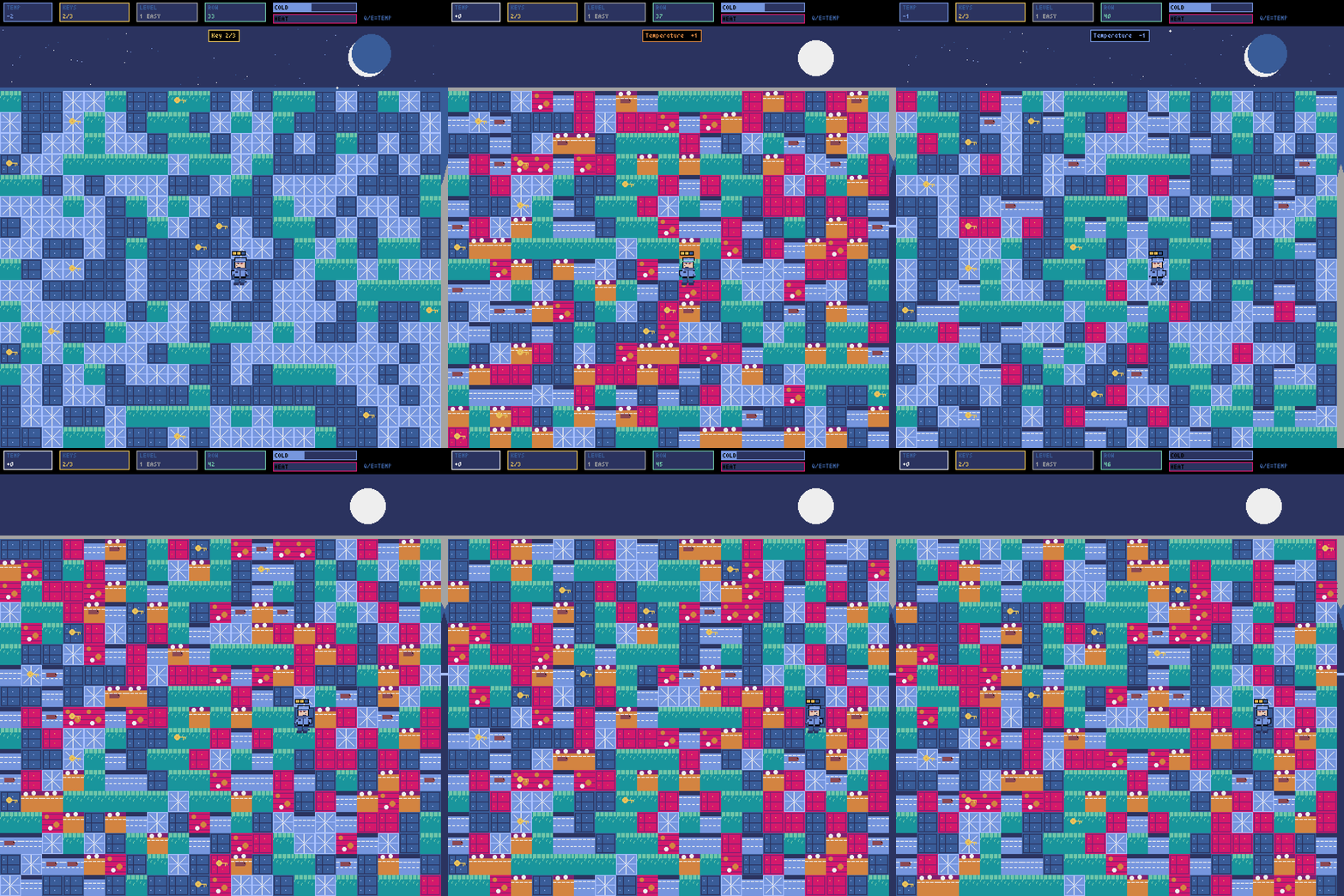
The central mechanic that sets ThermoTrail apart from any other runner. At any moment you can adjust the world temperature with Q (cooler) or E (warmer). The gauge runs from -2 to +2, and changing it physically transforms the terrain around you in real time.
Cool the world to -1 and lava fields become walkable hot rock. Cool it further to -2 and even lava solidifies into solid stone. Warm things up to +1 and frozen lakes melt into deadly open water. Push to +2 and even the deep ice breaks apart entirely.
This means a lava field blocking your path can be frozen solid into walkable stone simply by cooling the world. An impassable frozen lake can become crossable water if a beaver is paddling on it — or a lethal drop if it isn't. The ThermoGauge doesn't just help you — it can also make safe tiles dangerous, so every temperature change requires careful thought.
Terrain Types
The world is composed of nine terrain types, each with distinct properties and visual appearance.
Grass — Safe to walk on, but dangerous to linger. The longer you stand on grass, the closer the Eagle gets.
Stone — Safe, neutral ground. No hazards, no slow-down. The most reliable surface in the game.
Water — Deadly unless frozen (at -1 or below, it becomes Ice) or occupied by a beaver. Falling in means instant death.
Hot Water — Like water, but worse — scalding heat builds up even as you cross. Can be cooled to regular Water or frozen to Ice. Safe to cross if a beaver is present.
Ice — Safe to walk on, but at negative temperatures it steadily fills your Cold Meter. Melts to Water at +1 or above.
Deep Ice — A thicker, darker variant of ice found in higher difficulty zones. Requires +2 temperature to melt fully. Causes more dangerous cold buildup per step than regular ice.
Hot Rock — Glowing, scorching stone that rapidly raises your Heat Meter. Cool the world to -1 or below and it becomes safe, normal Stone.
Lava — Instantly lethal. One step and the run is over. Cool the world to -2 and it solidifies completely into traversable Stone. Mastering this transformation is essential in the later levels.
Mud — Slow and sticky. Safe to walk on, but adds 3 extra frames to every step you take. Exclusive to Hard difficulty, and it can trap you at the worst possible moment.
The Beaver
Some Water and Hot Water tiles have a beaver swimming on the surface. These tiles are safe to step on — the beaver supports your weight and carries you across. Keep an eye out for the small creature icon on the water. A well-placed beaver can open up an entirely new route through what looked like an impassable section.
Survival Meters
Two danger meters are always visible in the HUD. Either one reaching maximum means death.
The Cold Meter fills when the temperature is at -1 or -2, and when standing on Ice or Deep Ice in cold conditions. It drains slowly when you return to neutral terrain and warmer temperatures. The Cold Warrior character has double cold resistance, making this meter fill at half the normal rate.
The Heat Meter fills when the temperature is at +1 or +2, and when standing on Hot Rock or Hot Water. Lava fills it instantly and completely — there is no surviving a lava step, no matter how low your Heat Meter is. The Heat Hero character has double heat resistance.
Both meters drain gradually when you are in neutral conditions, so short bursts into dangerous temperature zones can be manageable if you retreat in time.
The Eagle
A hidden threat that punishes safe play. If you spend too long standing on Grass tiles, an eagle begins circling overhead. After roughly 85 consecutive frames on grass, a warning flashes in the HUD. If you remain on grass past the critical threshold, the eagle dives and the run ends immediately. Move off grass tiles to reset the timer and send it away. It is easy to forget about the eagle when you are focused on temperature management — which is exactly when it gets you.
Characters
Choose your ThermoWalker before the run begins. Each character is fully animated with walking cycles, directional facing, idle animations, and elemental auras that activate under matching temperature conditions.
Cold Warrior (press 1) — Draped in blue, this survivor of the northern glaciers has double resistance to cold damage. The Heat Meter depletes at normal speed. A glowing blue aura pulses around the character when the temperature is negative. Best suited for runs heavy in Ice, Deep Ice, and Lava that has been cooled to Stone.
Heat Hero (press 2) — Clad in orange and red, this veteran of volcanic expeditions has double resistance to heat damage. The Cold Meter depletes at normal speed. A warm orange aura radiates outward when the temperature is positive. Best suited for runs dominated by Hot Rock, Hot Water, and Mud.
Three-Level Campaign
ThermoTrail 512 is structured as a progressive three-level campaign. Each level generates a unique procedural world with increasing complexity, and completing a level's fortress unlocks the next.
Level 1 — Easy. The introductory chaos zone. Collect 3 keys to unlock the fortress. The terrain is a manageable mix of Grass, Stone, Water, Ice, Hot Water, Hot Rock, and occasional Lava patches. A good place to learn the ThermoGauge without being overwhelmed. Movement speed is at its slowest, giving you time to think through each step.
Level 2 — Medium. The stakes rise sharply. Collect 5 keys across a far more volatile landscape. Deep Ice makes its first appearance, requiring +2 temperature to melt. Lava patches are more frequent and harder to route around. Movement speed increases, so you have less time to react. Strategic temperature management is no longer optional — it is the only way through.
Level 3 — Hard. The final chaos zone. Collect 7 keys across the most hostile terrain in the game. Mud tiles appear throughout, slowing every step and forcing longer exposure to dangerous ground. Deep Ice dominates the cold zones, Lava is everywhere, and movement speed is at its fastest. Only the most disciplined ThermoWalkers make it to the fortress here.
HUD Layout
The top bar shows all critical information at a glance. On the left, the TEMP display shows the current ThermoGauge value, color-coded blue for cold, orange for hot, and white for neutral. Next to it is the KEYS counter showing how many keys you have collected versus how many are needed. The LEVEL display shows the current level number and difficulty name. The ROW counter tracks the furthest row you have reached in the current run.
On the right side, two horizontal bars show the Cold Meter and Heat Meter filling in real time. When the eagle is circling, a red warning flashes in the top-right corner. A persistent Q/E reminder keeps the temperature controls visible at all times.